What Quantization Actually Costs You
Quantization stores a model's weights in fewer bits, so it fits in less memory and often runs faster. Where the quality goes, and how to measure it.
By Cogniq Labs ResearchEvidence policy
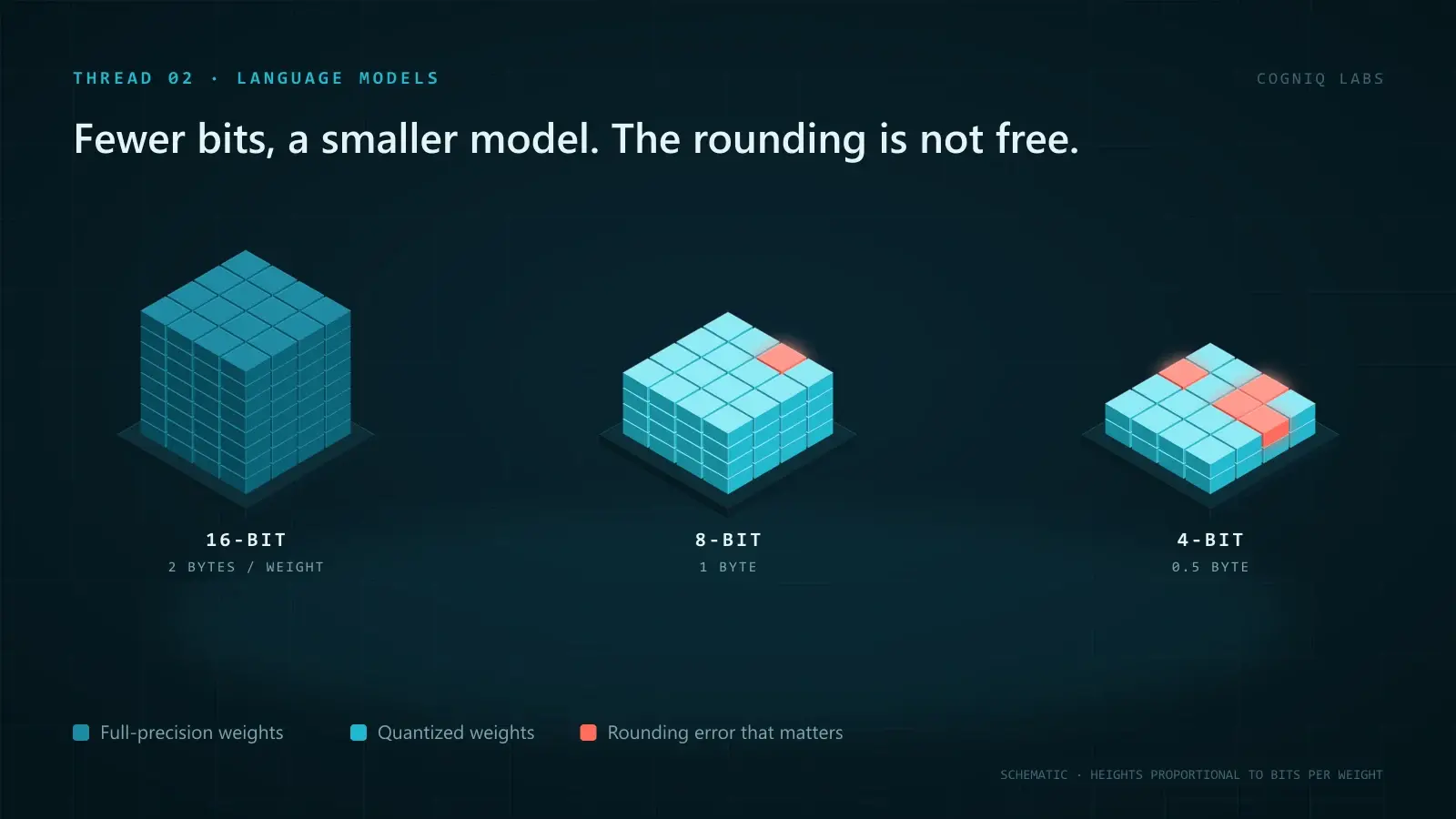
Quantization stores a model's numbers in fewer bits. Instead of keeping every weight as a 16-bit value, you keep it as an 8-bit or 4-bit one, plus a small scale factor that maps it back to roughly the right size. The model then needs a half or a quarter of the memory for its weights, and in many setups it generates text faster too.
The cost is rounding error. Every weight is nudged to the nearest value the smaller format can represent, and those nudges add up. At 8 bits the effect is usually small. At 4 bits it is usually tolerable and sometimes not. Below that, it is often severe. Where your model and task fall on that curve is something you measure, not something you can read off a model card.
What quantization actually does
A 16-bit number can take tens of thousands of distinct values. A 4-bit number can take sixteen. Quantization maps each weight onto one of those few levels.
In the simplest version, you take a block of weights, find the largest absolute value, and divide the available levels evenly between minus and plus that value. Each weight is stored as the index of its nearest level, and the block stores one scale factor so the values can be reconstructed at run time. Smaller blocks mean more scale factors, which costs a little memory and buys accuracy, because each block's levels fit its own range more closely.
Everything else in the field is a refinement of that idea: choosing the levels more cleverly, deciding which weights deserve more precision, and adjusting the rounding so the errors cancel out rather than accumulate.
The memory arithmetic
Weights take bytes per parameter times the number of parameters. As illustrative arithmetic for a 70 billion parameter model, weights only:
| Precision | Bytes per weight | Approximate weight memory |
|---|---|---|
| 16-bit | 2 | ≈ 140 GB |
| 8-bit | 1 | ≈ 70 GB |
| 4-bit | 0.5 | ≈ 35 GB, plus scale factors |
That table is why quantization is everywhere. The difference between 140 GB and 35 GB is the difference between several data-centre GPUs and one, or between a server and a workstation.
Two things are missing from the table. The first is the KV cache, which grows with every token of every concurrent request and can rival the weights on long prompts; we have written about what the KV cache actually costs you. The second is activations and framework overhead. A model whose quantized weights only just fit has not really fitted, because it has no room left to serve anyone.
Why it often runs faster as well
Generating text one token at a time is mostly limited by how fast weights can be read from memory, not by arithmetic. Every token requires reading every weight. Halving the bytes per weight roughly halves the data moved per token, which is why quantization can speed up generation as well as shrink the model.
The GPTQ authors report end-to-end inference speedups of around 3.25 times on A100 GPUs and 4.5 times on A6000 GPUs against 16-bit, using their 3 and 4-bit models. Speedups like that depend on having efficient kernels for the quantized format on your hardware. Without them, the weights may be decompressed back to 16 bits before every operation, and you save memory without saving time.
Outliers: why naive rounding breaks
If weights and activations were spread evenly, simple rounding would work well. They are not. Large language models develop a small number of values that are far larger than the rest, and those outliers stretch the range a block of levels has to cover, which leaves fewer levels for everything else.
The LLM.int8() paper traced this to highly systematic emergent features in transformer models. Its solution keeps the outlier dimensions in 16-bit and multiplies the rest, over 99.9 percent of values, in 8-bit. With that, the authors report that 175 billion parameter models can run in 8-bit without performance degradation.
AWQ makes a related observation about weights: protecting only around 1 percent of salient weights can greatly reduce quantization error. The important detail is how those weights are found. AWQ identifies them from the activations they meet, not from the weights' own sizes, then scales those channels so they survive rounding. GPTQ takes a different route, using approximate second-order information to adjust the remaining weights as each one is rounded, so errors are compensated rather than left to pile up.
The common lesson: a few values carry a disproportionate share of what the model does, and good quantization methods spend their precision there.
Weights, activations and the KV cache are separate choices
"A 4-bit model" usually means 4-bit weights only. There are three different things you can quantize, and they behave differently.
| What is quantized | What it saves | Main risk |
|---|---|---|
| Weights only | Memory for the model; faster decoding | Quality loss at low bit widths |
| Weights and activations | Also speeds up the arithmetic itself | Activation outliers are harder to handle |
| KV cache | Memory per token per request; more concurrent users | Errors in long-context recall |
KV cache quantization is the least discussed and often the most useful for serving. The KIVI method quantizes the cache to 2 bits without tuning, and its authors report 2.6 times less peak memory including the model weights, allowing up to 4 times larger batch sizes and 2.35 to 3.47 times higher throughput in their tests. For a service limited by how many requests fit on a GPU, that matters more than shrinking the weights further.
Where the quality goes
The honest summary of the evidence is that losses are small at 8 bits, real but often acceptable at 4 bits, and large below that, and that the exact numbers depend on the model.
An empirical study of LLaMA 3 quantization evaluated ten post-training and fine-tuning methods across 1 to 8 bits, and found LLaMA 3 still suffers non-negligible degradation, especially at ultra-low bit widths, with a significant gap remaining at low bit widths.
There is also a reason to expect this to get harder rather than easier. Scaling Laws for Precision reports that the degradation introduced by post-training quantization increases as models are trained on more data. Modern models are trained on far more tokens per parameter than older ones, which packs more information into each weight and leaves less room for rounding. Results from quantizing models of a few years ago may flatter models trained today.
Averages also hide where the damage lands. A small drop on a broad benchmark can conceal a larger drop on the narrow capability your application depends on. That is the same reason a leaderboard does not tell you which model to run in production.
Quantize a bigger model or run a smaller one?
At a fixed memory budget, you can usually choose between a larger model quantized harder and a smaller model kept at higher precision. There is no general answer, but there are useful defaults.
| Situation | Usually worth trying first |
|---|---|
| Memory allows a larger model at 8 bits | The larger model at 8 bits |
| Choice is between a larger model at 4 bits and a smaller one at 16 bits | Both, measured on your task |
| Only fits at 3 bits or below | The smaller model, at higher precision |
| Narrow, repeatable task | A small model, possibly fine-tuned, then quantized |
| Serving many concurrent users | Quantize the KV cache as well as the weights |
The middle row is where measurement matters most. Moderate quantization of a larger model often wins, but the advantage shrinks as bits fall, and it reverses at some point that differs between model families. For narrow work, remember that small models are winning the fights that matter, and that a small model quantized is smaller still.
Quantization also changes what fine-tuning costs. QLoRA fine-tunes small adapter weights on top of a frozen 4-bit base model, and its authors report fine-tuning a 65 billion parameter model on a single 48 GB GPU while preserving full 16-bit fine-tuning task performance.
How to test a quantized model
A quantized model is a different model. Test it as one.
- Build an evaluation set from real requests. A few hundred examples with known good answers, covering your hardest cases, not only typical ones.
- Run the full-precision model first. That is your baseline for quality, latency and memory.
- Run each quantized variant on the same set. Keep everything else, prompts, decoding settings and context length, identical.
- Compare where it matters. Look at the cases that changed, not only the average score. A handful of new failures on critical requests outweighs a flat average.
- Measure on your serving setup. Tokens per second and memory at your real batch size and context length, on your hardware and inference engine.
- Test long contexts separately if you quantize the KV cache, since that is where cache errors show up.
The result is a small table of quality, speed and memory for each option, which is the only version of this trade-off that applies to you.
What we do not know
We do not know how far the quality cost of low-bit quantization will grow as models are trained on more data, or how much better methods and quantization-aware training will offset it. The published evidence points in both directions. We would not assume that a bit width that worked for one model generation will work for the next, and we would re-run the evaluation whenever the base model changes.
Sources
- LLM.int8(): 8-bit Matrix Multiplication for Transformers at Scale — arXiv
- GPTQ: Accurate Post-Training Quantization for Generative Pre-trained Transformers — arXiv
- AWQ: Activation-aware Weight Quantization for LLM Compression and Acceleration — arXiv
- An empirical study of LLaMA3 quantization: from LLMs to MLLMs — arXiv
- Scaling Laws for Precision — arXiv
- KIVI: A Tuning-Free Asymmetric 2bit Quantization for KV Cache — arXiv
- QLoRA: Efficient Finetuning of Quantized LLMs — arXiv
Frequently asked questions
What is quantization in LLMs?
It is storing a model's numbers, usually its weights, at lower precision, for example 8 or 4 bits instead of 16. Each value is rounded to the nearest level a smaller number format can represent, with a scale factor to map it back. The model takes less memory and often generates text faster, at the cost of some rounding error.
Does quantization reduce model quality?
Usually a little at 8 bits, more at 4 bits, and sharply below that. The size of the loss depends on the model, the method and the task. One study found LLaMA 3 suffers non-negligible degradation under quantization, especially at ultra-low bit widths, so it must be measured on your own workload.
How much memory does a 4-bit model need?
Roughly half a byte per parameter for the weights, plus a small overhead for scale factors. As illustrative arithmetic, a 70 billion parameter model needs about 140 GB at 16 bits, 70 GB at 8 bits and 35 GB at 4 bits, before the KV cache and activations.
Is it better to run a bigger quantized model or a smaller full-precision one?
Often the bigger quantized model, at moderate bit widths such as 4 or 8 bits, but not always and not at very low bit widths. The only reliable answer comes from comparing both on your own evaluation set at the same memory budget.
What is the difference between GPTQ and AWQ?
Both are post-training methods for quantizing weights to around 3 or 4 bits. GPTQ uses approximate second-order information to choose rounding that minimises error layer by layer. AWQ uses activation statistics to find the small share of weights that matter most and protects them by rescaling before quantization.
Related reading
Mixture of Experts: Cheaper per Token, Not per GPU
A mixture-of-experts model runs only a few experts per token, so compute falls. Every expert still has to sit in memory. Where that trade pays off.
Which Model Should You Actually Run in Production
Leaderboards rank models on a distribution your workload does not resemble. The four axes that decide it, and how to build the comparison that matters.
Small Models Are Winning the Fights That Matter
Most production tasks are narrow. A decision rule for when a small specialised model beats a frontier one on cost, latency and accuracy.